
A smart camera with local storage records footage to a memory card, recorder, or other local destination, so cloud service is not the only way to save clips. My best overall pick is the eufy Security E30 4K Indoor Camera for buyers who want sharp indoor video, while the Kasa 2K+ KC400 stands out as a practical wired monitor and the Reolink OMVI 3i brings multi-lens coverage and tracking to larger areas. The main tradeoffs are indoor versus outdoor use, simple memory-card recording versus a dedicated recorder, and lower setup effort versus broader coverage. Local storage still depends on the camera’s recording method, network, and storage capacity, so check the details before choosing. Read on for the full breakdown of all 11 options and how they compare.

Get the latest gadgets delivered free with Prime
- Fast, free delivery on millions of items
- Prime Video, Amazon Music and more included
- Member-only deals all year
Complete the kit



Key Takeaways
- The eufy Security E30 4K is the roundup’s indoor image-quality pick, while the Kasa 2K+ KC400 is a more straightforward wired choice for everyday monitoring.
- The Reolink OMVI 3i is in a different coverage class: its PoE connection, triple-lens design, and auto tracking suit broader surveillance needs, but ask more of the installation.
- Local recording is not one uniform feature. Buyers should verify whether a camera uses a memory card, recorder, or another storage method and whether recording continues without internet access.
- Outdoor and remote-site needs change the ranking. The Vosker V150’s cellular and solar approach suits locations without dependable Wi-Fi, unlike indoor-first options such as the Kasa EC71 and Tapo C101.
- Multi-camera bundles can lower setup complexity for several viewpoints, but confirm storage support and whether each camera meets the placement, power, and coverage needs of your property.
| Kasa 2K+ Indoor Wired Security Camera, Baby & Pet Monitor, KC400 |  | Best for High-Detail Indoor Monitoring | Resolution: 2K+ (QHD) | Field of view: 130 degrees | Night vision: Up to 30 feet | VIEW ON AMAZON | See Our Full Breakdown |
| 2K Security Cameras 4 Pack, Indoor/Outdoor Home Cameras for Baby and Pets |  | Best Multi-Camera Local Storage Set | Resolution: 2304 x 1296 | Pack size: 4 cameras | Wi-Fi: Dual-band 2.4 GHz and 5 GHz | VIEW ON AMAZON | See Our Full Breakdown |
| Kasa EC71 1080p Indoor Pan/Tilt Security Camera | 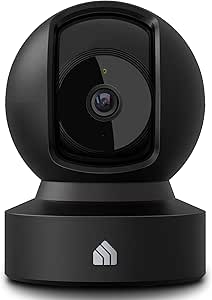 | Best Value for Room-Wide Coverage | Resolution: 1080p Full HD | Pan and tilt: 360 degrees horizontal; 113 degrees vertical | Night vision: Up to 30 feet | VIEW ON AMAZON | See Our Full Breakdown |
| Reolink OMVI 3i PoE Triple-Lens Security Camera with Auto Tracking |  | Best for Advanced Outdoor Local Recording | Resolution: 18MP total: 10MP panoramic plus 8MP pan/tilt | Panoramic field of view: 180 degrees | Night vision range: Up to 30 meters | VIEW ON AMAZON | See Our Full Breakdown |
| eufy Security E30 4K Indoor Camera |  | Best Premium Indoor Camera | Resolution: 4K UHD; 8MP photo sensor | Field of view: 360 degrees | Frame rate: 25 frames per second | VIEW ON AMAZON | See Our Full Breakdown |
| TP-Link Tapo C101 1080p Indoor Security Camera |  | Best Value for Simple Indoor Local Recording | Resolution: 1080p | Night vision: Up to 30 ft | Field of view: 117 degrees | VIEW ON AMAZON | See Our Full Breakdown |
| Vosker V150 4G LTE Solar Cellular Security Camera |  | Best for Remote Sites Without Wi-Fi | Connectivity: 3G/4G LTE cellular; no Wi-Fi | Power: Rechargeable battery and solar powered | Storage: 32 GB | VIEW ON AMAZON | See Our Full Breakdown |
| REOLINK E1 4MP Indoor Wi-Fi Security Camera | 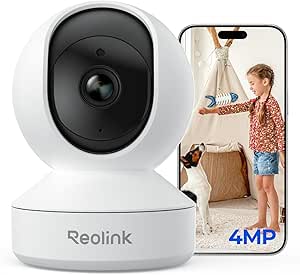 | Best for Flexible Local Recording | Resolution: 4MP | Pan range: 355 degrees | Night vision: Up to 40 ft | VIEW ON AMAZON | See Our Full Breakdown |
| 2 Pack 4MP Wireless Outdoor Security Cameras with Color Night Vision |  | Best Two-Camera Local-Storage Bundle | Included cameras: 2 | Resolution: 4MP (2560 × 1440) | Night vision: Full-color and infrared | VIEW ON AMAZON | See Our Full Breakdown |
| Youkey 2K Indoor Security Camera with 360° View |  | Best for 360-Degree Indoor Tracking | Resolution: 2K | Field of view: 360 degrees | Detection: Human, pet, and crying detection | VIEW ON AMAZON | See Our Full Breakdown |
| MaaX V1 2.5K Indoor/Outdoor Wired Security Camera with Color Night Vision |  | Best Built-In Storage for Indoor/Outdoor Use | Resolution: 4 MP | Field of view: 135° | Local storage: 64 GB built-in | VIEW ON AMAZON | See Our Full Breakdown |
| smart camera with local storage | Resolution | Night vision | Connectivity | Audio |
|---|---|---|---|---|
| Kasa 2K+ Indoor Wired Security | 2K+ (QHD) | Up to 30 feet | Wi-Fi | — |
| 2K Security Cameras 4 Pack | 2304 x 1296 | Color night vision with white LEDs | — | — |
| Kasa EC71 1080p Indoor Pan/Til | 1080p Full HD | Up to 30 feet | 2.4 GHz Wi-Fi | Two-way audio |
| Reolink OMVI 3i PoE Triple-Len | 18MP total: 10MP panoramic plus 8MP pan/tilt | — | PoE Ethernet; no Wi-Fi | — |
| eufy Security E30 4K Indoor Ca | 4K UHD; 8MP photo sensor | Color and infrared | — | Two-way audio |
| TP-Link Tapo C101 1080p Indoor | 1080p | Up to 30 ft | 2.4 GHz Wi-Fi | Two-way audio with built-in siren |
| Vosker V150 4G LTE Solar Cellu | — | — | 3G/4G LTE cellular; no Wi-Fi | — |
| REOLINK E1 4MP Indoor Wi-Fi Se | 4MP | Up to 40 ft | 2.4 GHz Wi-Fi | Two-way talk |
| 2 Pack 4MP Wireless Outdoor Se | 4MP (2560 × 1440) | Full-color and infrared | — | Two-way audio |
| Youkey 2K Indoor Security Came | 2K | Infrared | 2.4 GHz Wi-Fi and Bluetooth | Two-way audio |
| MaaX V1 2.5K Indoor/Outdoor Wi | 4 MP | — | 2.4 GHz and 5 GHz Wi-Fi | Two-way audio |
More Details on Our Top Picks
Kasa 2K+ Indoor Wired Security Camera, Baby & Pet Monitor, KC400
The Kasa KC400 is a strong fit when local recording and sharper-than-1080p indoor footage matter more than a moving camera. Its 2K+ resolution and 130-degree view give a useful look at a room, while motion, sound, and person detection can help narrow alerts to activity worth checking. A microSD card supports local storage up to 256 GB, with cloud storage available as another option. Compared with the Kasa EC71, the KC400 trades pan-and-tilt coverage for higher resolution and a wider fixed view; it cannot follow activity around a room. It also needs continuous power, and the card is not included. I’d choose it for a nursery or pet area where a steady, detailed view is more useful than remote camera movement.
Pros:- 2K+ resolution provides more detail than the 1080p Kasa EC71.
- 130-degree field of view covers a broad area without pan-and-tilt movement.
- Supports microSD recording up to 256 GB as well as optional cloud storage.
- Motion, sound, and person detection pair with night vision for around-the-clock indoor monitoring.
Cons:- MicroSD card must be purchased separately.
- Corded power limits placement and means it cannot operate as a battery camera.
- Indoor-only design rules it out for porches, yards, and other exposed areas.
Best for: People monitoring one indoor room who want a wide, detailed fixed view and local microSD recording.
Not ideal for: Anyone needing outdoor coverage, battery-powered placement, or a camera that pans to follow movement; the EC71 is a better fit for moving coverage.
- Resolution:2K+ (QHD)
- Field of view:130 degrees
- Night vision:Up to 30 feet
- Local storage:MicroSD up to 256 GB; card not included
- Connectivity:Wi-Fi
- Power:Corded electric
- Smart home compatibility:Google Assistant and Amazon Alexa
Our verdict“Choose the KC400 for a wide, high-detail indoor view with local recording, but pick the Kasa EC71 if you need pan-and-tilt coverage.”
2K Security Cameras 4 Pack, Indoor/Outdoor Home Cameras for Baby and Pets
This four-camera set is the lineup’s practical choice for covering several rooms or a mix of indoor and outdoor areas without relying on a single viewpoint. Each camera records at 2304 x 1296, supports SD cards up to 128 GB, and adds IP65 weather resistance and color night vision for exterior use. Dual-band Wi-Fi gives it more network flexibility than the 2.4 GHz-only Kasa EC71, though the EC71 offers pan-and-tilt movement that these fixed cameras lack. The set supports continuous recording, but each camera needs constant power and its own SD card is not included. Advanced AI features and cloud storage require a subscription, so I’d focus on this option for broad local coverage rather than subscription-free smart detection across multiple views.
Pros:- Four cameras make it easier to cover multiple locations than a single-camera option like the KC400.
- 2304 x 1296 video and color night vision support useful day-and-night monitoring.
- IP65 weather resistance suits outdoor installation.
- Supports continuous recording to SD cards, with optional cloud storage.
Cons:- Every camera requires a constant power connection.
- SD cards are not included, adding a separate storage requirement for local recording.
- Advanced AI features and cloud storage require a subscription.
Best for: Households that want several fixed camera views across indoor spaces and weather-exposed areas, with local SD recording.
Not ideal for: Buyers seeking battery-powered cameras, built-in pan-and-tilt tracking, or advanced AI features without a subscription.
- Resolution:2304 x 1296
- Pack size:4 cameras
- Wi-Fi:Dual-band 2.4 GHz and 5 GHz
- Night vision:Color night vision with white LEDs
- Weather resistance:IP65
- Local storage:SD cards up to 128 GB; cards not included
- Detection range:33 to 66 feet (10 to 20 meters)
Our verdict“Pick this set when several fixed, weather-resistant camera views matter more than battery operation or subscription-free advanced AI.”
Kasa EC71 1080p Indoor Pan/Tilt Security Camera
The Kasa EC71 makes local storage more useful in a busy room by pairing microSD recording with 360-degree horizontal pan and 113-degree tilt. Motion tracking can follow activity that would leave the KC400’s fixed frame, while person and baby-cry detection offer alerts tailored to common household monitoring needs. Its 1080p image is less detailed than the KC400’s 2K+ video and the eufy Security E30’s 4K, but the camera’s movement can cover more of a room from one position. Local cards up to 256 GB are supported, though you supply the card yourself. The main compromises are corded power and 2.4 GHz Wi-Fi only; I’d choose it for flexible indoor coverage, not for the sharpest footage or outdoor use.
Pros:- Pan-and-tilt movement and motion tracking cover more of a room than the fixed-view KC400.
- Supports local microSD recording up to 256 GB without requiring cloud storage.
- Person and baby-cry detection can make alerts more relevant for household monitoring.
- Two-way audio and night vision add useful communication and low-light coverage.
Cons:- 1080p resolution provides less image detail than the KC400 and eufy E30.
- MicroSD card is not included.
- Uses 2.4 GHz Wi-Fi and requires corded power.
Best for: Families and pet owners who want one indoor camera to follow movement around a room and record locally.
Not ideal for: Buyers who prioritize 4K or 2K+ detail, need 5 GHz Wi-Fi, or want outdoor monitoring.
- Resolution:1080p Full HD
- Pan and tilt:360 degrees horizontal; 113 degrees vertical
- Night vision:Up to 30 feet
- Local storage:MicroSD up to 256 GB; card not included
- Connectivity:2.4 GHz Wi-Fi
- Audio:Two-way audio
- Smart home compatibility:Amazon Alexa and Google Home
- Dimensions:3.23 x 3.23 x 4.43 inches
Our verdict“Choose the EC71 for affordable room-wide movement tracking with local storage, rather than maximum resolution.”
Reolink OMVI 3i PoE Triple-Lens Security Camera with Auto Tracking
The Reolink OMVI 3i is the specialist pick for buyers building a wired outdoor surveillance setup around local recording. Its 180-degree panoramic view and separate 8MP pan-and-tilt lens combine broad scene coverage with a closer, tracking view—an approach that goes well beyond the simpler fixed views of the four-camera 2K set. Recording can go to microSD, an NVR, FTP, or NAS, making this the most flexible storage option in this group for a networked system. AI detection covers people, vehicles, and animals, with color and infrared night vision for different lighting conditions. The tradeoff is a more involved installation: it uses PoE Ethernet, not Wi-Fi, and dual-screen viewing depends on compatible Reolink software and firmware. I’d skip it for a quick, wireless indoor setup.
Pros:- Combines a 180-degree panoramic view with an 8MP tracking camera for broad coverage and closer detail.
- Local recording supports microSD, NVR, FTP, and NAS rather than relying on one storage method.
- AI detection identifies people, vehicles, and animals.
- IP66 weather resistance and color or IR night vision suit outdoor use.
Cons:- PoE Ethernet is required; the camera does not support Wi-Fi.
- MicroSD card is not included.
- Dual-screen viewing depends on compatible Reolink software and firmware.
Best for: Homeowners or small-site operators who can run Ethernet and want broad outdoor coverage with several local recording destinations.
Not ideal for: Renters or casual buyers who need Wi-Fi installation, a simple indoor monitor, or a setup without Reolink software and firmware requirements.
- Resolution:18MP total: 10MP panoramic plus 8MP pan/tilt
- Panoramic field of view:180 degrees
- Night vision range:Up to 30 meters
- Connectivity:PoE Ethernet; no Wi-Fi
- Local storage:MicroSD up to 512 GB, NVR, FTP, or NAS
- Weather resistance:IP66
- Recording:Continuous recording supported
- Video compression:H.264 and H.265
Our verdict“Choose the OMVI 3i for a wired outdoor system that needs panoramic coverage and flexible local recording, not for simple wireless setup.”
eufy Security E30 4K Indoor Camera
For buyers who want high resolution and room-wide tracking in one indoor camera, the eufy Security E30 is the premium choice here. It records in 4K, pans and tilts through a 360-degree view, and can track people and pets while recording to a local SD card without a required subscription. That combination offers more detail and movement coverage than the fixed-view Kasa KC400, while also exceeding the EC71’s 1080p resolution. The tradeoffs are practical: the SD card is sold separately, and HomeKit video is limited to 1080p, so the full resolution benefit depends on how you access the footage. It is indoor-only and needs Wi-Fi. I’d choose it for a connected home where sharp local footage and flexible assistant compatibility matter more than keeping the setup simple.
Pros:- 4K recording captures more detail than the 1080p EC71 and 2K+ KC400.
- 360-degree pan and tilt with AI tracking covers movement across a room.
- Local SD storage works without a required subscription.
- Supports HomeKit, Alexa, and Google Assistant, with two-way audio and color or infrared night vision.
Cons:- SD card is sold separately.
- HomeKit video resolution is limited to 1080p.
- Indoor-only design and Wi-Fi connectivity limit placement options.
Best for: Smart-home owners who want 4K indoor footage, automatic tracking, and local SD recording without a required monthly subscription.
Not ideal for: Buyers who need outdoor coverage, included storage media, or 4K video through HomeKit.
- Resolution:4K UHD; 8MP photo sensor
- Field of view:360 degrees
- Frame rate:25 frames per second
- Local storage:SD card; sold separately
- Night vision:Color and infrared
- Audio:Two-way audio
- Smart home compatibility:HomeKit, Alexa, and Google Assistant
- Dimensions and weight:2.8 x 2.9 x 4.2 inches; 12.48 ounces
Our verdict“Choose the E30 for premium 4K indoor coverage with local recording, provided you accept the separate SD card and HomeKit resolution limit.”
TP-Link Tapo C101 1080p Indoor Security Camera
The Tapo C101 is a straightforward choice for buyers who want local microSD recording and useful alerts without moving up to a more elaborate pan-and-track camera. It records 1080p footage, detects motion, people, and baby crying, and adds two-way audio for checking in from the app. Compared with the REOLINK E1 4MP, it gives up resolution, pan coverage, and tracking, but it can be a better fit when a fixed view and basic event monitoring are enough. The tradeoff is a constant power connection, plus a separately purchased card; its 2.4 GHz-only Wi-Fi may also limit placement on some networks. I’d choose it for a room where a simple, subscription-optional recording setup matters more than sharper detail or broad coverage.
Pros:- Records locally to a microSD card up to 512 GB
- Person, motion, and baby-crying alerts cover common indoor monitoring needs
- Two-way audio and a built-in siren add response options
- Works with Alexa, Google Assistant, RTSP, and ONVIF
Cons:- Must stay connected to its DC power adapter
- microSD card is sold separately
- 2.4 GHz Wi-Fi only
Best for: Budget-conscious households that want local recording and person or baby-cry alerts in one indoor room
Not ideal for: Buyers who need a battery-powered camera, 5 GHz Wi-Fi, or pan-and-tilt coverage
- Resolution:1080p
- Night vision:Up to 30 ft
- Field of view:117 degrees
- Frame rate:15 fps
- Storage:microSD up to 512 GB; card sold separately
- Connectivity:2.4 GHz Wi-Fi
- Audio:Two-way audio with built-in siren
- Power:DC adapter; not battery-powered
Our verdict“Choose the Tapo C101 for affordable, fixed-view indoor monitoring with local storage, but pick the REOLINK E1 if you want higher resolution and automatic tracking.”
Vosker V150 4G LTE Solar Cellular Security Camera
The Vosker V150 fills a different niche from indoor Wi-Fi cameras: it sends motion-triggered photos over cellular from sites without a local network, such as a gate, shed, or remote property. Its solar panel and rechargeable battery avoid a nearby outlet, while 32 GB of listed storage provides an onboard recording component. Compared with the battery-powered 2 Pack 4MP Wireless Outdoor Security Cameras, the V150 is better suited to places beyond Wi-Fi range, but it sends photos rather than giving the same kind of conventional video-camera coverage. Cellular availability and an ongoing service plan are part of the ownership equation, and the battery needs a 24-hour charge before first use. I’d pick it for remote monitoring, not as a direct substitute for a household camera built around continuous local video.
Pros:- Cellular connection works without Wi-Fi
- Solar panel and rechargeable battery support wire-free placement
- Includes a preactivated SIM and 32 GB of storage
- AI image recognition and hybrid time-lapse and motion detection support remote monitoring
Cons:- Requires cellular coverage and a service plan
- Alerts are motion-triggered photos, not conventional live video monitoring
- Battery must be charged for 24 hours before first use
Best for: Landowners and site managers monitoring gates, cabins, or equipment where cellular service exists but Wi-Fi and mains power do not
Not ideal for: Households seeking live Wi-Fi video, continuous local video recording, or a camera without cellular-plan costs
- Connectivity:3G/4G LTE cellular; no Wi-Fi
- Power:Rechargeable battery and solar powered
- Storage:32 GB
- Detection range:90 ft
- Night vision range:80 ft
- Alert type:Motion-triggered photo alerts
- Operating temperature:-40°C to 50°C
- SIM card:Preactivated SIM included
Our verdict“Choose the V150 for remote locations with cellular coverage; for a home Wi-Fi setup with local video, the 2 Pack 4MP cameras are a closer fit.”
REOLINK E1 4MP Indoor Wi-Fi Security Camera
Among these indoor picks, the REOLINK E1 offers one of the more flexible local-storage paths: footage can go to a microSD card, compatible NVR, or Reolink Home Hub. That gives buyers room to build beyond a single camera, unlike the simpler card-based setup of the Tapo C101. Its 4MP image, 355-degree pan, and motion tracking also help cover a room without manually repositioning the unit. Those capabilities come with a wired-power requirement and 2.4 GHz Wi-Fi, and this model does not support RTSP or ONVIF despite its multiple recording options. It is a stronger match for buyers who value camera movement and storage-system flexibility; skip it if open integration with third-party recording software matters more than the Reolink ecosystem.
Pros:- 4MP resolution and night vision up to 40 feet
- 355-degree pan and motion tracking help follow activity across a room
- Supports microSD, compatible NVR, and Reolink Home Hub storage
- Privacy mode, two-way talk, and multiple-user app support
Cons:- Requires corded power
- Does not support RTSP or ONVIF
- Indoor-only and not water resistant
Best for: Indoor-camera buyers who want pan tracking and a choice of microSD, NVR, or Reolink Hub recording
Not ideal for: People needing battery operation, outdoor protection, or RTSP/ONVIF integration with third-party systems
- Resolution:4MP
- Pan range:355 degrees
- Night vision:Up to 40 ft
- Storage:microSD up to 512 GB, compatible NVR, or Reolink Home Hub/Home Hub Pro
- Connectivity:2.4 GHz Wi-Fi
- Audio:Two-way talk
- Power:Corded electric, 5V
- Usage:Indoor
Our verdict“Choose the REOLINK E1 if you want room-tracking coverage and several local recording routes; choose the Tapo C101 for a simpler fixed-view setup.”
2 Pack 4MP Wireless Outdoor Security Cameras with Color Night Vision
This two-camera bundle is the practical pick for buyers who want to cover more than one outdoor area without choosing separate models. Each camera records 4MP video, offers color and infrared night vision, and supports microSD storage up to 256 GB as well as cloud storage. Battery power and solar-panel compatibility give the pair more placement flexibility than wired options such as the indoor REOLINK E1, though the listed details do not specify a recording hub or included SD cards. The 2.4 GHz-only Wi-Fi requirement may also affect where they connect, and some alarm functions need manual setup. I’d favor this kit when two outdoor viewpoints and flexible power matter most; buyers seeking a single camera with a clearly defined expandable storage system may prefer the Reolink approach.
Pros:- Two cameras provide coverage for separate outdoor areas
- 4MP video with both full-color and infrared night vision
- microSD recording up to 256 GB per the listed storage specification, plus cloud option
- Battery-powered design is compatible with solar panels
Cons:- Supports 2.4 GHz Wi-Fi only
- microSD cards are not included
- Some alarm features require manual setup
Best for: Homeowners who need two outdoor viewpoints, local card recording, and battery or solar-compatible placement
Not ideal for: Buyers with 5 GHz-only networks or those who want included SD cards and a clearly specified centralized recorder
- Included cameras:2
- Resolution:4MP (2560 × 1440)
- Night vision:Full-color and infrared
- Wi-Fi:2.4 GHz only
- Battery:5000 mAh
- Storage:microSD up to 256 GB and cloud
- Power:Battery-powered; solar-panel compatible
- Audio:Two-way audio
Our verdict“Choose this bundle for two battery-powered outdoor views with local card storage, but opt for the REOLINK E1 if you need a more established multi-device recording ecosystem indoors.”
Youkey 2K Indoor Security Camera with 360° View
The Youkey 2K pairs broad room coverage with local SD recording up to 256 GB, making it a fit for buyers who want one indoor camera to follow activity rather than leave blind spots around a fixed lens. Its 360-degree view and AI tracking are complemented by detection for people, pets, and crying, so it can serve as a flexible room or nursery monitor. Compared with the REOLINK E1 4MP, it lists a wider 360-degree view and pet detection, while the Reolink offers a higher stated resolution and more storage destinations, including NVR and Home Hub. The Youkey also requires a power connection, and its card is sold separately; 2.4 GHz Wi-Fi is another limitation. I’d choose it for automated indoor coverage, not for buyers building a larger local-recording system.
Pros:- 2K video with infrared night vision
- 360-degree coverage with automatic motion tracking
- Detects people, pets, and crying
- Local SD recording without a required monthly fee
Cons:- SD card is sold separately
- Supports 2.4 GHz Wi-Fi only
- Storage is limited to a local SD card up to 256 GB in the listed specifications
Best for: Families and pet owners who want a single indoor camera to pan across a room and record locally to an SD card
Not ideal for: Buyers seeking battery operation, 5 GHz Wi-Fi, or NVR and hub-based storage options
- Resolution:2K
- Field of view:360 degrees
- Detection:Human, pet, and crying detection
- Night vision:Infrared
- Storage:Local SD recording up to 256 GB; card sold separately
- Connectivity:2.4 GHz Wi-Fi and Bluetooth
- Audio:Two-way audio
- Smart home compatibility:Amazon Alexa and Google Assistant
Our verdict“Choose the Youkey for 360-degree indoor tracking and straightforward SD recording; choose the REOLINK E1 for higher stated resolution and more local-storage destinations.”
MaaX V1 2.5K Indoor/Outdoor Wired Security Camera with Color Night Vision
The MaaX V1 is a strong fit for buyers who want continuous local recording without adding a memory card or relying on a cloud subscription: its 64GB built-in storage is the clearest differentiator in this group. Its 4MP video, 135° view, and color night vision give it a wider, more detailed view than the 1080p Kasa EC71, while the IP65 housing lets it cover a sheltered outdoor spot as well as an indoor room. Dual-band Wi-Fi and two-way audio add flexibility for alerts and conversation.
The tradeoff is installation: unlike battery-powered outdoor options such as the 2 Pack 4MP Wireless Outdoor Security Cameras, the MaaX needs wired power. The camera is rated for cold conditions, but its power adapter is rated only from 32°F to 104°F, which limits confidence in freezing outdoor setups. Choose it for dependable local recording near an outlet; skip it if cable-free placement is a priority.
Pros:- Built-in 64GB storage supports local recording without a separate card or cloud subscription.
- 4MP resolution and a 135° field of view capture more detail and a broader area than 1080p indoor options such as the Kasa EC71.
- IP65-rated housing supports indoor and outdoor placement.
- Color night vision, two-way audio, and dual-band Wi-Fi provide useful monitoring and communication features.
Cons:- Requires wired power, restricting placement compared with battery-powered outdoor cameras.
- The power adapter is rated only for 32°F to 104°F, limiting suitability for exposed installations in freezing weather.
- Its fixed wall-mount design is less adaptable for repositioning than pan-and-tilt indoor models such as the Kasa EC71.
Best for: Homeowners who want subscription-free 24/7 recording in a fixed indoor or sheltered outdoor location with access to wired power.
Not ideal for: Renters or anyone placing a camera far from an outlet, especially outdoors in freezing conditions where the power adapter’s temperature rating is a limitation.
- Resolution:4 MP
- Field of view:135°
- Local storage:64 GB built-in
- Weather resistance:IP65
- Connectivity:2.4 GHz and 5 GHz Wi-Fi
- Audio:Two-way audio
- Video format:MP4
- Mount type:Wall mount
- Smart home compatibility:Amazon Alexa and Google Assistant
Our verdict“Choose the MaaX V1 if built-in subscription-free recording and indoor/outdoor flexibility matter more than cable-free installation.”

How We Picked
I ranked these cameras around the needs behind the search: keeping usable footage locally, choosing a camera that fits the placement, and avoiding a setup that adds unnecessary cost or complexity. I compared the listed resolution and coverage features, wired, Wi-Fi, PoE, and cellular connectivity, indoor or outdoor suitability, and practical functions such as pan-and-tilt, tracking, night vision, and solar power. I also treated local storage as a point to verify rather than assuming every product supports the same storage format or records in every network condition.
The order favors cameras that appear to balance everyday usability, useful coverage, and a clear local-recording role. Higher-ranked specialized models are not automatically right for everyone: the Reolink OMVI 3i suits ambitious fixed installations, while the Vosker V150 addresses remote sites where Wi-Fi is unavailable. Bundle listings and lesser-known models can be compelling for multi-camera coverage, but buyers should check the exact storage method, included accessories, app functions, and recording behavior before purchase.
| smart camera with local storage | Audio |
|---|---|
| Kasa 2K+ Indoor Wired Security | — |
| 2K Security Cameras 4 Pack | — |
| Kasa EC71 1080p Indoor Pan/Til | Two-way audio |
| Reolink OMVI 3i PoE Triple-Len | — |
| eufy Security E30 4K Indoor Ca | Two-way audio |
| TP-Link Tapo C101 1080p Indoor | Two-way audio with built-in siren |
| Vosker V150 4G LTE Solar Cellu | — |
| REOLINK E1 4MP Indoor Wi-Fi Se | Two-way talk |
| 2 Pack 4MP Wireless Outdoor Se | Two-way audio |
| Youkey 2K Indoor Security Came | Two-way audio |
| MaaX V1 2.5K Indoor/Outdoor Wi | Two-way audio |
Factors to Consider When Choosing Smart Camera With Local Storage
Before choosing a model, I would settle the recording and placement questions first. A camera’s headline resolution matters less if the storage method does not match your retention needs or the unit cannot reliably reach its installation spot.
Check What “Local Storage” Means for That Camera
Local storage may mean a memory card inside the camera, a hub, or footage sent to a network video recorder; these options are not interchangeable. Card recording is often the simplest route for one camera, while a recorder can be more convenient when several cameras need centralized storage. Check whether the card is included, the supported capacity, and whether the camera overwrites old clips when storage fills. Confirm whether continuous recording, event clips, or both are available, since that affects how much footage you retain. Do not assume that local storage means every smart feature works without internet: remote viewing, alerts, and app access may still rely on a network connection. Match the storage method to your desired retention period before comparing resolution.
Decide How Much Internet Independence You Need
Local recording and internet independence are separate questions. A camera may save footage on-site while still requiring Wi-Fi for setup, notifications, or viewing clips away from home. If the internet drops, ask whether recording continues and whether footage can be retrieved directly from the camera or recorder afterward. Remote properties may need cellular service, as with the Vosker V150, while a wired PoE camera can provide a stable local network connection without relying on Wi-Fi coverage. Cellular models also bring a separate connectivity plan and signal considerations. Choose around the failure you most want to tolerate: cloud outages, home internet loss, weak Wi-Fi, or a full power interruption.
Plan Power and Installation Before Buying
Power requirements can rule out a camera before its features matter. Wired indoor cameras are easy to keep running near an outlet, but cable placement may limit where they can go. PoE can simplify a permanent installation by carrying power and data on one cable, though it may call for compatible networking equipment and more planning. Solar cellular cameras can suit isolated sites, but their usefulness depends on sunlight, mounting position, and cellular reception. For outdoor installations, check the stated weather suitability and how exposed cables, connectors, and mounting points will be protected. Sketch the camera position and route to power or network access before selecting a model.
Choose Coverage for the Scene, Not Just the Resolution
Resolution affects detail, but it does not tell you how much of a room or yard the camera can see. A fixed camera may give a clear view of one entrance, whereas pan-and-tilt can cover changing areas and multi-lens systems can watch a broader scene. Auto tracking may help follow movement, but it cannot replace correct mounting height or eliminate blind spots. Night vision also varies in how it handles distance, motion, and color; consider whether identifying a person at the far end of a driveway matters more than monitoring a nearby room. Avoid buying a high-resolution camera for a wide area if its lens and placement leave key zones out of frame. Draw the area you need covered and choose the field of view and movement features accordingly.
Estimate Retention, Not Just Storage Capacity
A card or recorder’s capacity alone does not tell you how many days of footage it will hold. Continuous recording uses storage faster than event-triggered clips, and higher resolution can increase the amount written per hour. Motion sensitivity, activity in the scene, and recording schedules also affect retention. Decide whether you need a few days for checking recent events or a longer archive, then compare the camera’s recording modes and supported storage capacity against that target. Set overwrite behavior deliberately so a full device does not silently stop saving new events or erase footage sooner than expected. If an incident may require preservation, plan a way to export important clips before the camera cycles through them.
Balance One-Camera Simplicity Against a Multi-Camera System
A single camera is easier to place, configure, and maintain, but it may leave entry points or approach paths unseen. Bundles can cover several angles at once, though their advertised camera count does not guarantee a complete system: check storage arrangements, power supplies, mounting hardware, and whether every unit can use the same app and recording setup. A multi-camera network can also increase storage use and Wi-Fi load, particularly when several devices stream high-resolution video. For a home with a few specific blind spots, adding cameras gradually can reveal which views are actually useful. For larger properties, a recorder-based or PoE setup may be easier to manage than a collection of unrelated Wi-Fi cameras. Prioritize a coherent recording plan over the largest camera count.
Frequently Asked Questions
Will a camera with local storage keep recording if my internet goes down?
It may, but local storage alone does not guarantee offline recording. Check the specific model’s recording behavior during an internet outage, and distinguish internet access from local Wi-Fi or wired-network access. Some cameras can continue saving footage to a card or recorder while remote viewing and phone alerts stop working. Cellular cameras have a different connection path, but still depend on power and cellular coverage. If outage recording is a priority, look for explicit offline or network-loss behavior in the product documentation rather than relying on the phrase “local storage.”
Is a memory card enough, or should I choose a camera that works with a recorder?
A memory card can be a sensible fit for a single camera or a small setup where simple on-device recording meets your retention needs. A recorder is more appealing when you want footage from multiple cameras in one place or need a more centralized system. The choice affects installation, storage management, and how footage is retrieved, not just capacity. Check whether the camera supports continuous recording, the card or recorder limits, and what happens when storage fills. If you expect to expand later, confirm that the cameras and recorder are compatible before building around one device.
Can I view recorded clips remotely if the footage stays at home?
Often, remote viewing is available through the camera’s app, but it usually requires the home camera or recorder to remain connected to the internet. The footage can stay on local storage while the app provides remote access; that does not mean the camera must upload every recording to cloud storage. App features and connectivity requirements vary, so check whether remote playback, downloads, and alerts are available without a subscription. Also consider who can access the account and how the system protects remote logins. If you want to avoid internet access altogether, plan to retrieve footage locally instead.
How much local storage do I need for continuous recording?
There is no single capacity that suits every camera because retention depends on resolution, recording mode, activity, and the number of devices sharing storage. Continuous recording generally consumes more space than motion-triggered clips, while higher-resolution video can shorten the time before footage is overwritten. Start with the number of days you want to keep and check the camera’s supported storage limits and recording controls. For multiple cameras, calculate retention across the whole system rather than treating each camera’s storage independently. If footage from a particular event must be kept, export it rather than assuming the camera will preserve it indefinitely.
What should I choose for a property without reliable Wi-Fi?
First separate the need for local recording from the need for remote access. A wired PoE setup can avoid weak Wi-Fi when you can run network cable and have suitable networking equipment, while a cellular camera can connect from a remote site with adequate mobile coverage. Solar power may help where mains power is unavailable, but sunlight, mounting, and cellular signal all affect the setup. A camera that records locally but depends on Wi-Fi for alerts may still meet your needs if you can check footage on-site. Check network-loss recording, power requirements, and ongoing connectivity needs before deciding.
Conclusion
For most indoor buyers, I would start with the eufy Security E30 4K as the best overall option in this lineup, with the Kasa 2K+ KC400 a strong fit for a simpler wired monitoring setup. The 2K Security Cameras 4 Pack is the best value-style choice for buyers who need several viewpoints, provided its storage method and included components match their plan. For a premium, more involved installation, the Reolink OMVI 3i brings PoE, multiple lenses, and tracking; buyers new to home monitoring may prefer the more approachable TP-Link Tapo C101. For a remote site without dependable Wi-Fi, the Vosker V150 is the specialist pick. Before choosing, verify local-recording details, power, and outage behavior for the exact model—those details matter more than a resolution number alone.
Halloween Picks
halloween
As an affiliate, we earn on qualifying purchases.